
1. Available Tones
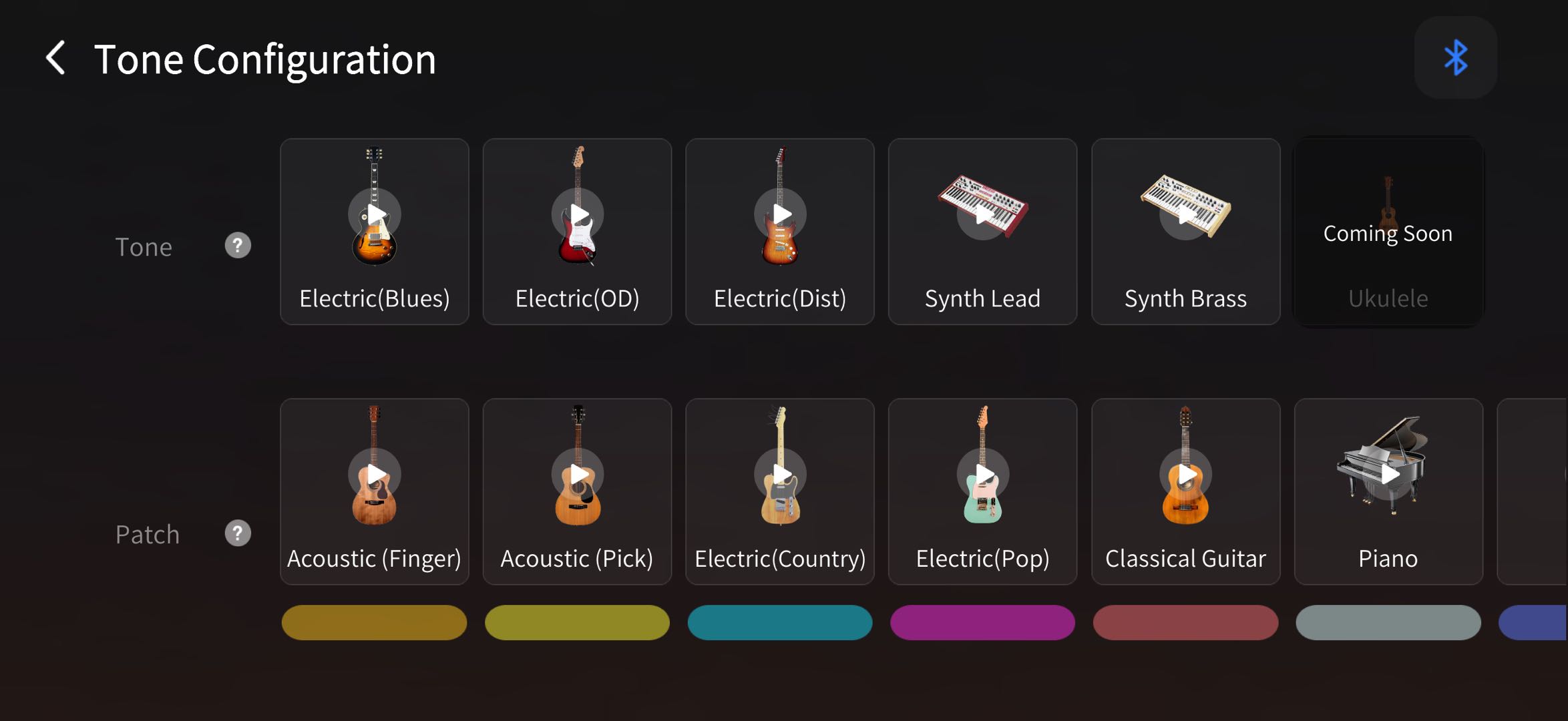
The latest Soundbank version includes 14 built-in tones, including:
1.1 9 Default Tones:
- Acoustic (Finger)
- Acoustic (Pick)
- Electric (Country)
- Electric (Pop)
- Classical Guitar
- Piano
- Bass
- Banjo
- FM Electric Piano
1.2 Additional Tones :
- Electric (Dist)
- Electric (OD)
- Electric (Blues)
- Synth Lead
- Synth Brass
2. Tone Slots & Customization
The guitar provides 9 tone slots for quick access during use.
You can customize these slots by dragging and assigning different tones in the app.
This allows you to replace existing tones with any of the available sound options based on your preference.
3. How to change tones?
3.1 Via the Guitar app
- Scan the QR code to download the guitar app.
App Store Google Play
- Open the guitar app and connect your guitar via Bluetooth.
- Go to the Guitar page → Tap "Tone".
- Drag and drop your desired tone into one of the tone slots.
- Select the tone to apply it.
 3.2 Press the "TONE" button on the AeroBand Guitar
Power on the guitar and press the center "TONE" button on the headstock to cycle through tones.
Want to know more?
▶ Video guides:
👥 Connect with other users:
🌐 Official social media channels:
For additional assistance, please refer to the included manual or contact AeroBand customer support at support@aeroband.net.